Start with a controller
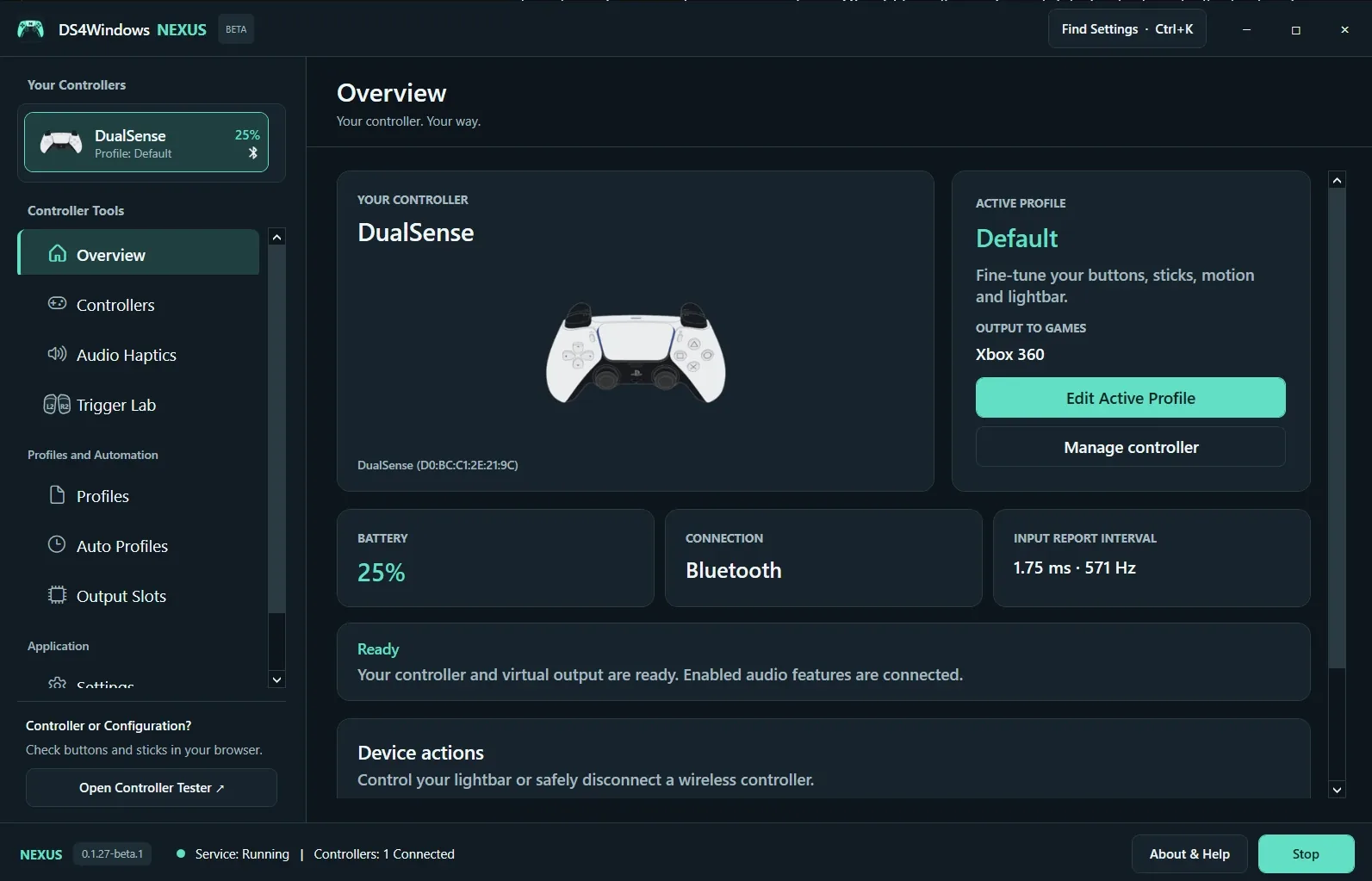
Connect a supported controller by USB or Bluetooth, start the controller service and select the device in the sidebar. Overview shows the selected controller, connection, battery and active profile. With two controllers connected, check the selected name before changing feedback or profiles.
Read the status cards
Output to Games names the virtual controller your profile presents. It can differ from the physical controller in your hands. Input Report Interval describes observed input reports; it is not the time from a button press to an image on your screen. A Ready message indicates software readiness, not a completed physical feedback test.
Choose your next task
Use Edit Active Profile for mappings and profile settings. Manage Controller opens device tools. Settings contains Guided Setup and Controller Health. Find Settings (Ctrl+K) helps locate a control without browsing every page. If no controller appears, start the service and check a data-capable USB cable before troubleshooting Bluetooth.
Screenshot values are examples, not recommended settings for every controller. Save a separate profile before experimenting.